SenseOn SOC Playbook: Data Exfiltration
This page gives the process that SenseOn recommends to managed providers of SenseOn, to extend the investigation of incidents in end customer estates. It also gives best practice guidance for additional manual threat hunting and containment.
Process Flowchart
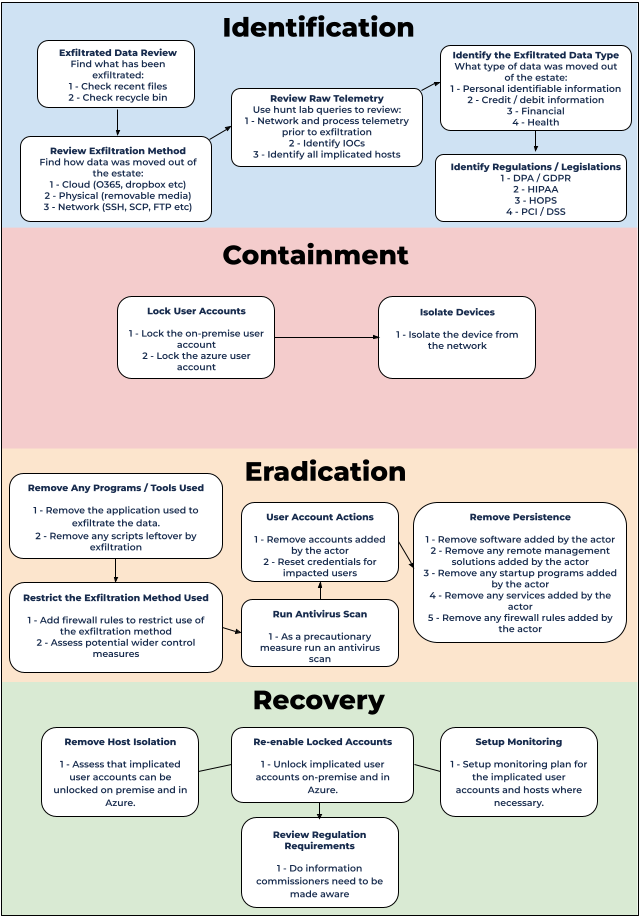
Identification
Assess what data has been exfiltrated
Joint action for customer and provider of SenseOn MDR
Assess all logs in the SenseOn platform and the logs that are available in third party tools. This includes end device logs. Use the logs to find the exfiltrated data.
Assess the method of data exfiltration
Joint action for customer and provider of SenseOn MDR
Find the method that the attacker used to exfiltrate the data from the estate. Probably, the method is in one or more of the exfiltration method categories that follow.
- Cloud - for example, O365, Dropbox and MegaUpload.
- Physical - Removable media, for example disks and drives.
- Network - for example, SSH, SFTP and FTP.
Review the raw telemetry
Action for provider of SenseOn MDR
Use Hunt Lab to query raw process and network telemetry. Look at what occurred in the period before the exfiltration of data.
Simple process telemetry query
SELECT
_time_observed, _hostname, username, parent_id, id, parent_name, name, command, parent_path, path
FROM
endpoint_process
WHERE
lower(_hostname) = lower('<place_hostname>')
AND _time_observed >= <place_time_in_unix_ms>
ORDER BY _time_observed ASC
Simple network telemetry query
SELECT
  _time_observed,_hostname, source_hostname, source_ip, dest_hostname, dest_ip, source_process_username, source_process_parent_id, source_process_id, source_process_parent_name, source_process_name, source_process_command, source_bytes_sent, dest_bytes_sent, *
FROM
  network_flow
WHERE
_time_observed >= (<place_time_in_unix_ms>-300000)
AND (
source_ip = '<place_host_IP_here>'
OR lower(source_hostname) like lower(<place_hostname_here>%)
)
ORDER BY
  _time_observed ASC
Review the raw telemetry continued
Action for provider of SenseOn MDR
The previous steps tried to find the exfiltrated data and the exfiltration method. These steps usually show IOCs. Use these IOCs to find the scope of the exfiltration.
For example, find if the exfiltration was limited to one user and host, or if it involved multiple hosts and user accounts. You can use the IOCs in Hunt Lab to assess the wider estate. Find if other users and hosts were involved.
Intelligence and enrichment
Action for provider of SenseOn MDR
We recommend that you assess the external destination of the data. This assessment can give crucial information about why and where the attacker exfiltrated the data. You can use these tools to assess the external destination:
- VirusTotal - VirusTotal is a threat intelligence platform for files and network destinations.
- GreyNoise - A database of internet scanners. Its aim is to remove the noise.
- ThreatTox - An IOC database.
- Shodan - A search engine for internet connected devices.
Identify the type of data that was exfiltrated
Joint action for customer and provider of SenseOn MDR
Assess the type of the exfiltrated data. Some examples of data types are:
- Personal identifiable information (PII)
- Financial information
- Health related data
- Credit/Debit card information
Identify any regulations or legislation to be aware of
Joint action for customer and provider of SenseOn MDR
End customer notification: Tell end customers and their Data Privacy Officers (DPOs) about a likely or suspected data breach as soon as practicable. Then they can engage with their legal counsel and meet potential reporting deadlines.
If attackers exfiltrated / stole sensitive data, review the related legislation. Find how standards and government regulatory bodies expect you to handle such a breach. For example, in the UK, the organisation must notify the information commissioner's office of a breach. The list that follows gives some regulations and legislation.
- DPA / GDPR - The data protection act helps to protect the data of people in the UK (GDPR in Europe). It controls what an organisation must do if there is a data breach.
Identify any regulations or legislation to be aware of continued
Joint action for customer and provider of SenseOn MDR
- HIPAA - The Health Insurance Portability and Accountability Act is American legislation. Its aim is to better protect the medical and personal identifiable information of people in the healthcare sector. It also aims to better control any transfer of such data.
- SOX - The Sarbanes-Oxley act is American legislation. Its aim is to better protect financial information in its records and reports, and during its transfer and storage.
- PCI/DSS - The Payment Card Industry / Data Security Standard is a standard that major banking card companies use. Examples are Visa and American express. The aim of this standard is to better protect the payment and banking information of people globally.
Containment
User account actions
Action for customer
- Lock on-premise user accounts, so that nobody can access them.
- Also lock cloud user accounts, for example through Azure AD.
- Then reset the passwords of affected accounts. Also revoke any current sessions and / or multiple factor authentication (MFA) codes.
- After this, remove newly added MFA methods.
Isolation
Joint action for customer and provider of SenseOn MDR
Isolate the devices that were involved in the data exfiltration from the network. This prevents more occurrences until the full remediation of the incident.
Eradication
Joint action for customer and provider of SenseOn MDR
- SenseOn MDR Provider: Remove any programs or scripts that the data exfiltration used.
- Customer: Decrease the possibility that someone uses the same method again. You can put firewall rules in place to do this. But also assess further control measures.
- Customer: Run an antivirus scan of any hosts involved in the exfiltration.
- SenseOn MDR Provider: Remove any custom software that was installed during the compromise window.
- SenseOn MDR Provider: Remove any software added to startup during the compromise window.
- SenseOn MDR Provider: Remove any service added during the compromise window.
- Customer: Remove any user accounts that were added during the window of compromise.
- Customer: Remove any firewall rules added during the compromise window.
- SenseOn MDR Provider: Remove any remote management solutions added during the compromise window.
Recovery
Joint action for customer and provider of SenseOn MDR
- SenseOn MDR Provider: Remove the device network isolation, so that the device can connect normally to the network.
- Customer: Unlock any locked on-premise or cloud user accounts.
- SenseOn MDR Provider: Set up a plan to monitor users and devices for more suspicious signs or unwanted activity.
- Customer: Review regulations and legislation. Find if you must notify anyone about the data exfiltration. This depends on how sensitive the data was, as the Identification section describes.