SenseOn Connect API Reference
SenseOn Connect is a bidirectional API that allows programmatic interaction with most data within the SenseOn platform.
API Capabilities
The API currently supports the following functionalities:
- Read security cases: Retrieve details of security cases.
- Update security cases: Include comments and update status.
- Read device information: Access information on all registered devices.
- Read all security observations: Access detailed observations related to security incidents.
- Read all raw telemetry: Obtain raw telemetry data for deeper analysis.
- Write security observations: This feature requires approval from SenseOn.
- AI case summaries: Access and generate AI-powered case summaries through the API.
- Read and update appliance settings: Read tenant settings by name or wildcard pattern, and update them programmatically.
All endpoints are served under https://<your-tenant>.senseon.io/api — for example, GET /v1/settings is requested as https://<your-tenant>.senseon.io/api/v1/settings. Authenticate by sending your token in the Authorization: Bearer <token> header.
Token Scopes
When creating a token, you grant it one or more scopes:
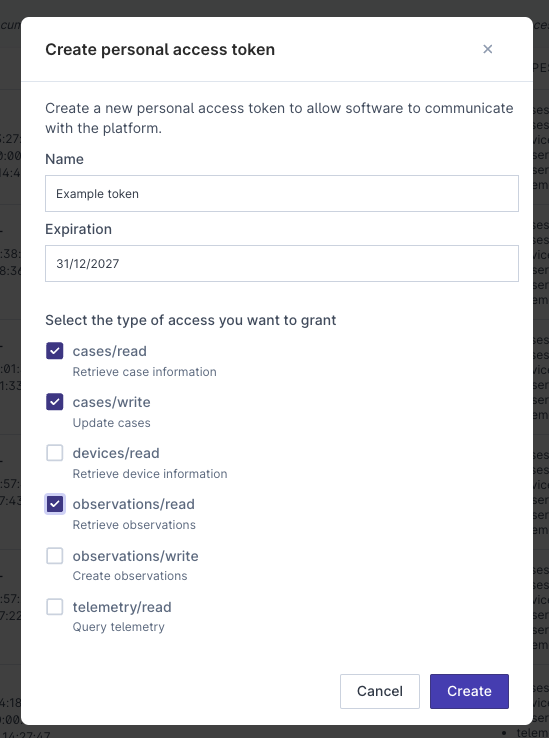
cases/read, cases/write, devices/read, observations/read, observations/write, telemetry/read, settings/read, settings/write
Rate Limiting
Each endpoint belongs to one of three rate-limiting tiers: low (~10 requests per minute), medium (~60 requests per minute), and high (~600 requests per minute). Exceeding a tier returns 429 Too Many Requests.
Create an API Token
To interact with the SenseOn Connect on your platform, you will need to create an access token. Navigate to Settings > Integrations > API Configuration.
On this page, you can view all tokens that have been created (including those that have been deleted), who created the token, their permissions, status, and last usage.
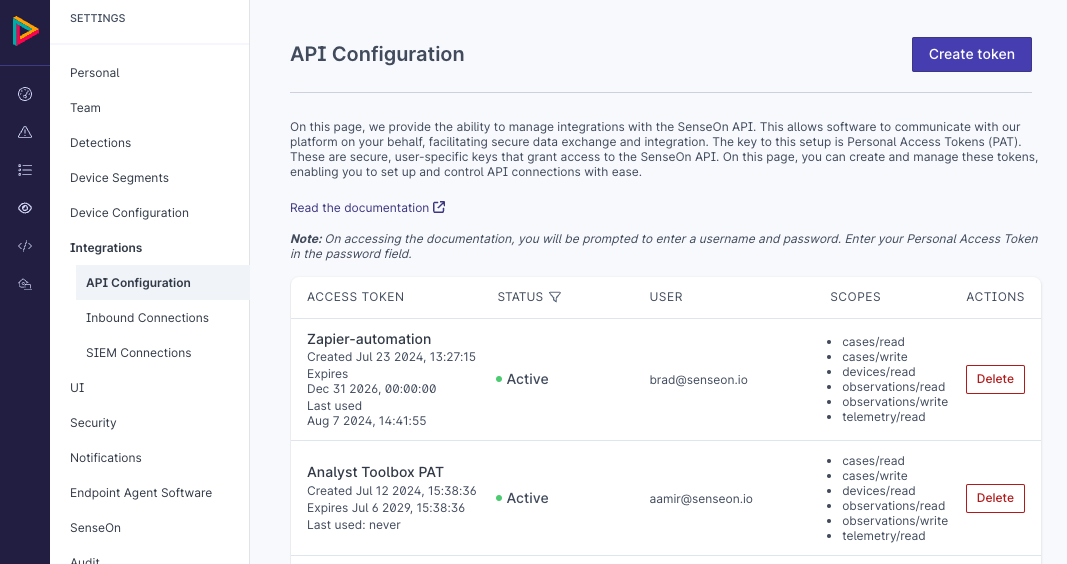
To create a new token, press the Create token button, and a popup will guide you through the process.
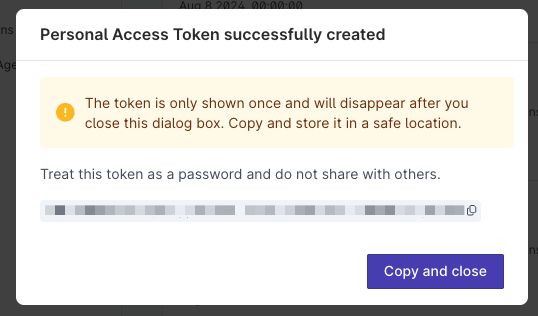
Once displayed, the token cannot be accessed again. If lost, a new token will need to be created.
Test the API
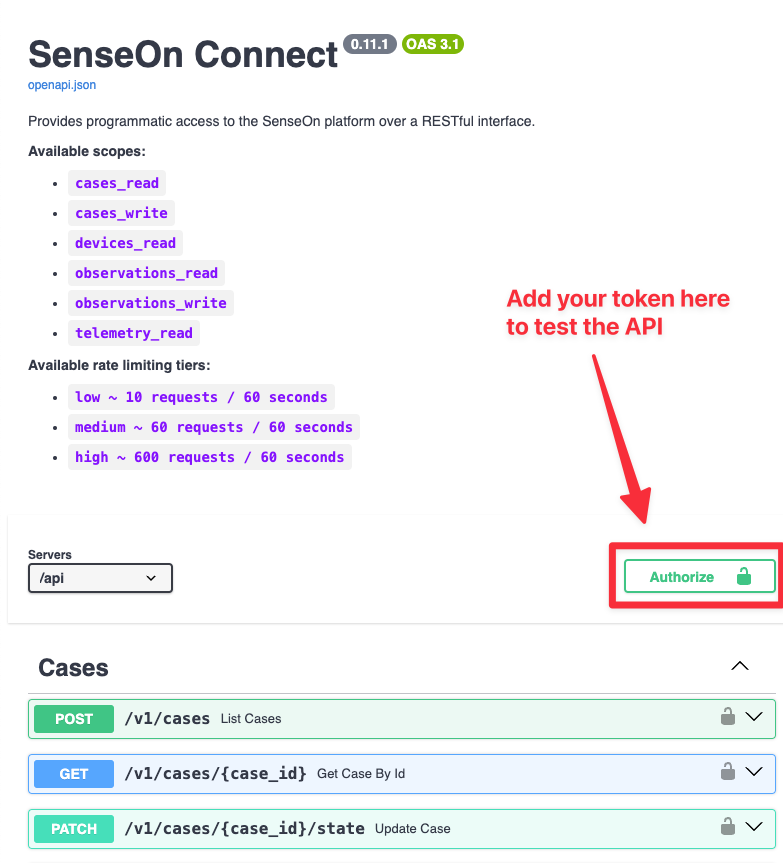
Next, you can access the live documentation and test out the API token with real data on your system. Click on Read the documentation.
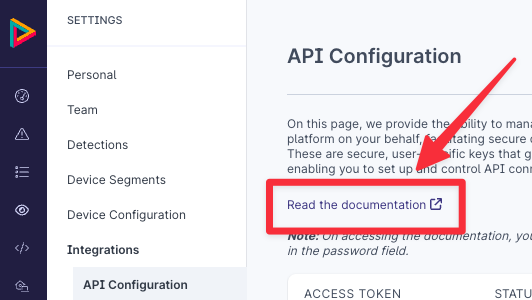
The documentation is protected with HTTP basic auth. To access it, enter any username and use the API token you generated as the password.
Authorise your API key with the documentation website by clicking Authorise.
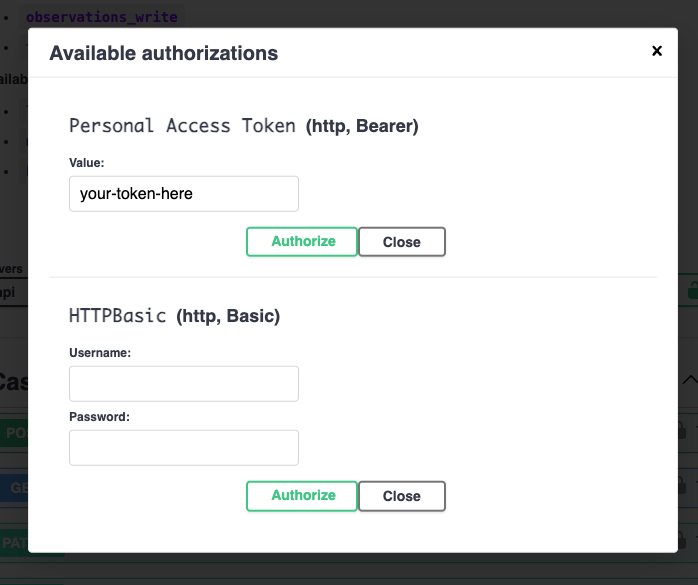
Then enter your token in the Personal Access Token field and select Authorise.
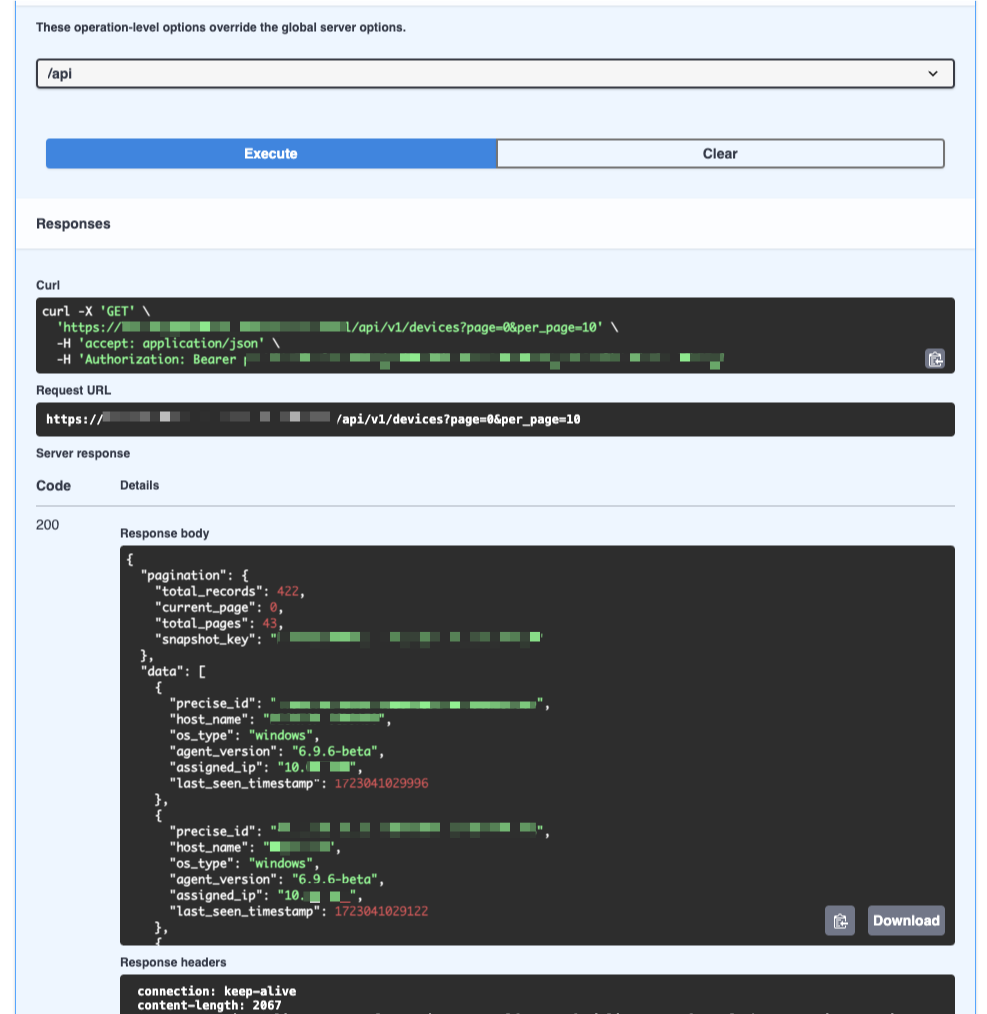
Each API feature can be explored in detail. By pressing Try it out and then Execute, you can submit real queries to the API and receive real responses. A cURL output is provided to facilitate easier integration with other tools.
AI Case Summaries
AI case summaries can be accessed and managed through the SenseOn Connect API:
- POST /v1/cases - Includes any AI summaries that have been generated already on cases
- POST /v1/cases/{case_id}/summary - Generates (or regenerates) a new LLM summary for a specific case
- GET /v1/cases/{case_id} - Retrieves case details including summaries, but only if they've been generated already
For more information about AI case summaries, see the AI Generated Case Summaries documentation.
Settings API
Appliance settings can be read and updated programmatically. Reads require the settings/read scope; updates require settings/write. A token can only access settings its creating user is permitted to see.
| Method | Path | Description |
|---|---|---|
GET |
/v1/settings?names=... |
Read one or more settings. Each name may be exact (senseon.llm.enabled) or a trailing-wildcard pattern (notifications.*). Settings the token may not read are returned with an error of NOT_AUTHORIZED; unknown names return NOT_FOUND. |
PUT |
/v1/settings |
Update one or more settings. The body maps setting names to new values. Updates are all-or-nothing: if any setting is unknown, not permitted, or fails validation, a 400 is returned mapping the offending names to error messages. |
Example read:
curl -H "Authorization: Bearer <token>" \
  "https://<your-tenant>.senseon.io/api/v1/settings?names=notifications.*"
Each returned setting includes its name, current value, kind, friendly_name, description, and whether your token has update_permission.
Personal Access Token API Endpoints
Personal Access Tokens (PATs) can be managed programmatically through the Customer Accessible API (CAA). See Personal Access Tokens for guidance on creating and scoping tokens via the UI.
Availability: PAT management endpoints are rolled out with appliance updates and may not be available on your tenant yet (the paths below return
404where not yet supported). Tokens can always be managed through the UI at Settings > Integrations > API Configuration.
Endpoints
| Method | Path | Description |
|---|---|---|
GET |
/senseonapi/caa/pats/scopes |
Return the scopes assigned to the authenticating token (the request must be made with that token) |
POST |
/senseonapi/caa/pats |
Create a new Personal Access Token |
GET |
/senseonapi/caa/pats |
List tokens owned by the authenticated user |
GET |
/senseonapi/caa/pats/all |
List tokens for all users (requires ui/caa_pat/admin permission) |
DELETE |
/senseonapi/caa/pats/{pat_id} |
Revoke a token by its ID (returns HTTP 204 on success) |
Create token request body
{
  "name": "my-integration",
  "expiry_at": 1798761599000,
  "scopes": ["cases/read", "devices/read"]
}
expiry_at is a timestamp in milliseconds since the Unix epoch, not an ISO 8601 string (the example above is 2026-12-31T23:59:59Z). It must be in the future.
The response includes the pat_id (UUID) and the token value. The token value is returned only once and cannot be retrieved again.
Service Account API Endpoints
Service accounts are non-human identities that authenticate to the Customer Accessible API through a single token. See Service Accounts for guidance on creating and managing them via the UI.
All service account endpoints require the ui/service_accounts/manage permission, held by the Admin role.
404where not yet supported). Service accounts can always be managed through the UI at Settings > Service Accounts.
Endpoints
| Method | Path | Description |
|---|---|---|
GET |
/senseonapi/service_accounts |
List all service accounts |
POST |
/senseonapi/service_accounts |
Create a service account |
GET |
/senseonapi/service_accounts/{user_id} |
Retrieve a single service account |
PATCH |
/senseonapi/service_accounts/{user_id} |
Update a service account (only the fields supplied are changed) |
DELETE |
/senseonapi/service_accounts/{user_id} |
Delete a service account and revoke its token (returns HTTP 204 on success) |
POST |
/senseonapi/service_accounts/{user_id}/token |
Issue the account's token, revoking any existing one |
DELETE |
/senseonapi/service_accounts/{user_id}/token |
Revoke the account's active token (returns HTTP 204 on success) |
Create service account request body
{
  "name": "SOC Automation",
  "description": "Automated case triage"
}
The name must be unique across service accounts. An identifying email is derived from the name at creation and does not change if the account is later renamed.
Update service account request body
Only the fields supplied are changed. Fields must not be sent as null: omit a field to leave it unchanged.
{
  "name": "SOC Automation",
  "description": "Automated case triage and export",
  "enabled": false
}
Issue token request body
{
  "scopes": ["cases/read", "cases/write"],
  "expiry_at": 1798761599000
}
expiry_at is a timestamp in milliseconds since the Unix epoch, or null for a token that never expires. The response includes the pat_id, scopes, expiry_at, and the token value. As with a personal access token, the value is returned only once. A 409 Conflict is returned if the account is disabled.
HTTP Status Codes
The API uses standard HTTP status codes. The following table covers codes specific to SenseOn behaviour:
| Code | Meaning |
|---|---|
200 OK |
Request succeeded |
201 Created |
Resource created successfully |
202 Accepted |
Asynchronous operation accepted (for example, a Hunt Lab query has been queued) |
204 No Content |
Successful deletion (for example, a PAT was revoked) |
400 Bad Request |
Invalid input: check the response body for a VALIDATION_ERROR detail |
401 Unauthorized |
Not authenticated: check your token or log in again |
403 Forbidden |
Authenticated but not authorised for this action |
404 Not Found |
The requested resource does not exist |
428 Precondition Required |
Step-up authentication is required before this action can proceed: re-authenticate and retry |
500 Internal Server Error |
Unexpected server error: contact support if this persists |
503 Service Unavailable |
The service is temporarily unavailable |
504 Gateway Timeout |
A database query timed out: try a more specific query or retry later |
Error Codes
Error responses include a machine-readable code field in the JSON body:
| Code | Description |
|---|---|
VALIDATION_ERROR |
One or more request fields failed validation |
INTERNAL_SERVER_ERROR |
An unexpected error occurred on the server |
INVALID_PAT_ID |
The specified Personal Access Token ID does not exist or does not belong to the authenticated user |
INVALID_ENDPOINT_ID |
One or more endpoint IDs in the request are invalid |
INVALID_SCRIPT_ID |
The specified script ID does not exist |
INVALID_ACTION_ID |
The specified action ID does not exist |
INVALID_CASE_ID |
The specified case ID does not exist |
INVALID_DEVICES |
One or more devices are not eligible for the requested action (wrong OS, unsupported agent version, etc.) |
INVALID_SCRIPT_INPUT |
One or more script parameters failed validation |
FORBIDDEN |
The authenticated user does not have permission for this action |
Rate Limiting
Certain endpoints enforce rate limits to protect platform stability:
| Endpoint | Limit |
|---|---|
GET /senseonapi/users/resend-invite |
1 request per 30 seconds per user |
POST /senseonapi/users/current/totp |
4 requests per second; 5 requests per 60 seconds |
Requests exceeding these limits receive a 429 Too Many Requests response. Wait for the limit window to pass before retrying.
Creating Observations
Observations can be created using the API, but this action requires prior approval from SenseOn. The review process will assess:
- The impact on any managed services.
- How the data will correlate with other observations.
- The volume of observations expected.
Contact the SenseOn support team to initiate this review process.