Deploying network probes within Operational Technology (OT) environments
The Purdue model is a reference architecture for industrial networks. It is usually used in Operational Technology (OT) environments. The primary use of network probes is to monitor network traffic in some areas. In these areas, technical and administrative reasons make it not feasible to deploy the SenseOn endpoint. This guide tells you when and where to put network probes to protect OT environments.
The Purdue Model Overview
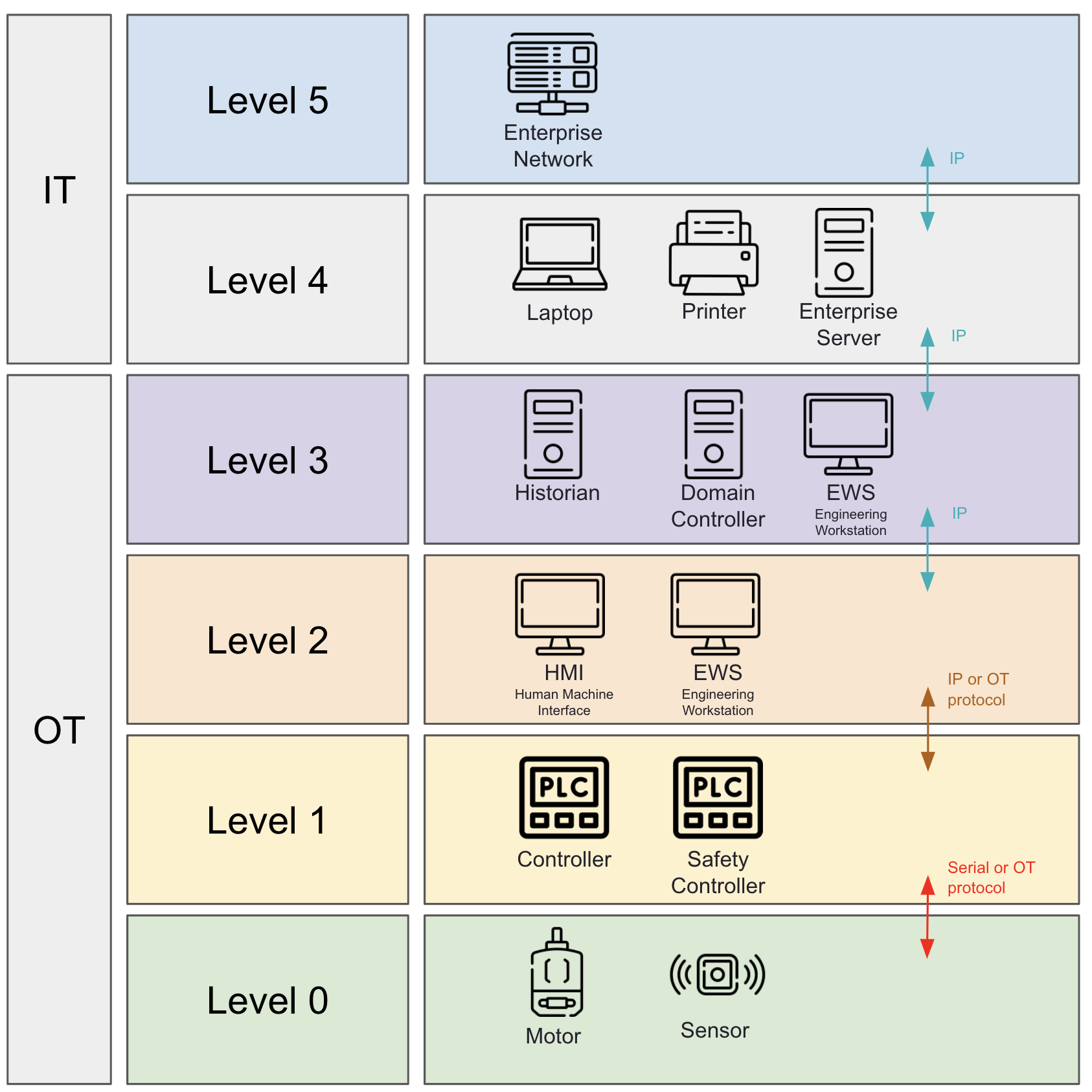
The Purdue model is a hierarchical representation of network architecture. It divides the IT and OT zones into different levels.
- Level 5 - Enterprise Zone: Wider Corporate IT systems.
- Level 4 - OT Business Planning and Logistics: Enterprise systems that are used to manage OT environments.
- Level 3 - Manufacturing Operations: Systems that manage the manufacturing process in a single site or process.
- Level 2 - Control Systems: Process control systems for real time management.
- Level 1 - Basic Control: Direct manipulation of the physical process in logic systems.
- Level 0 - Physical Process: Sensors and actuators that interface directly with machinery.
When to Deploy a Network Probe
Deploy network probes to monitor network traffic in areas where you cannot deploy the SenseOn endpoint. Examples of these areas are:
- Areas where you cannot deploy the endpoint software for technical reasons. Examples are legacy systems and devices with low compute resources.
- Areas where you cannot deploy the endpoint software for administrative reasons. Examples are certification requirements, and systems that a third party controls.
Where to Place Network Probes
Use the Purdue model as a guide. Deploy probes strategically to capture network telemetry at key points. The sections that follow give specific recommendations for each level.
Level 4 - Site Business Planning and Logistics
- Purpose: We recommend that you deploy the endpoint sensor on all traditional IT systems. You can use network probes to monitor communications between plant business systems and enterprise IT.
- Network probe placement:
- Between Level 4 and Level 5 (Enterprise Zone).
- Capture mirrored traffic at SPAN or TAP locations on the firewalls, switches, or routers between these zones.
Level 3 - Operations
- Purpose: In this domain, we recommend that you deploy the endpoint sensor to the systems that support it. You can use network probes to get visibility of the communication flows for the operations of a manufacturing process. Network probes can also detect possible attackers that try to pivot from IT environments to OT.
- Network probe placement:
- Capture mirrored traffic at SPAN or TAP locations on firewalls, switches, or routers in these zones.
Level 2 - Area Supervisory Control
- Purpose: It is possible to deploy the endpoint sensor to HMI (Human Machine Interface) or EWS (Engineering Work Station) systems. You can use network probes to extend coverage. In this system, it is common to deploy network probes. They monitor PLC (Programmable Logic Controller) and supervisory control communications on industrial switches.
- Network probe placement:
- Capture traffic from the switches that connect to HMIs and PLCs.
Additional details
For more details on network probes and their installation, refer to Network Probe Installation.