Active Response
Active Response is an analyst-led forensic tool designed to delve deeper into threats, granting direct access to endpoints. This empowers analysts to thoroughly investigate and respond effectively, providing crucial insights, confirming threats, and enabling manual remediation actions to neutralise threats and mitigate their impact.
Capabilities include retrieving suspicious files for in-depth analysis, deploying remediation scripts and files, terminating processes, isolating networks, and running cross-platform investigation scripts through a Python interpreter embedded in the endpoint agent.
Active Response is available on Windows and Linux endpoints.
Comprehensive audit trails of all activity are recorded.
Benefits
Active Response accelerates incident resolution, minimising damage and downtime by enabling a rapid response to threats, thus reducing the impact of a breach.
It helps reduce false positive volumes, enabling forensic-level investigations by providing security teams with direct, audited access to systems requiring investigation. This access can be extended to allow your 24/7 MDR provider to take action on your behalf.
How it works
Connectivity
Endpoints with the Universal Sensor installed and with Active Response enabled create a mutual TLS connection using a WebSocket to the analysis platform. No direct connection is made from Active Response users to the Active Response endpoints, all connections are via the SenseOn analysis platform. This means that no new firewall rules are required as it uses the same connectivity as the analysis platform.
Permissions
To use Active Response, a user needs Active Response access and an enrolled authenticator app (TOTP), and the endpoint must be in a segment with Active Response enabled. Active Response must also be switched on for your organisation, which SenseOn manages.
User permissions
Active Response access is granted and revoked on the Team page at Settings -> Team, from the Active Response item in a user's three-dot menu. Only an Admin who already has Active Response access can grant it, so SenseOn grants it to your first user. Users with access show an Active Response granted tag in the Team list.
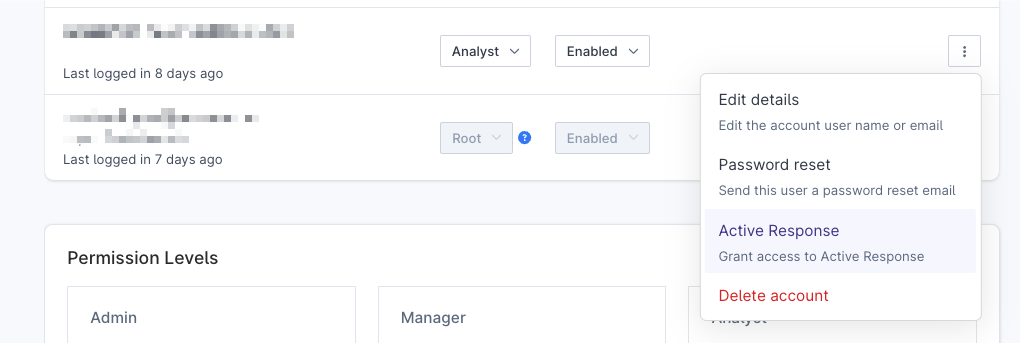
Enforced MFA: Users with Active Response access must use MFA, whatever your organisation's MFA setting.
Segment settings
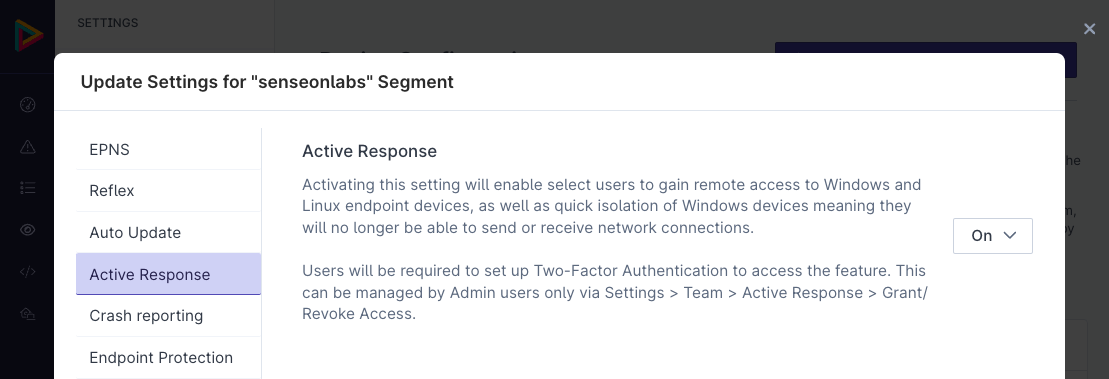
Active Response must be enabled on a segment to enable users with Active Response access to use it on those endpoints. Segments can be created or modified at Settings -> Device Configuration, where the feature can also be enabled under the segment configuration.
Step-Up Authentication
Before starting an Active Response session or granting Active Response access to another user, the platform requires you to re-confirm your identity. This is known as step-up authentication.
When step-up is triggered, you will be prompted to enter:
- Your SenseOn account password
- Your current TOTP code from your authenticator app
Step-up authentication is time-limited. If the window expires before you act, you will be prompted again. All step-up attempts, successful and failed, are recorded in the Audit Log.
Action Groups
Action Groups allow you to schedule a script or built-in action to run on one or more endpoints without opening an interactive session. This is useful for fleet-wide remediation or investigation tasks.
Scheduling an action group
- Navigate to Active Response.
- Select one or more endpoints from the device list (use the checkboxes).
- Click Schedule Action.
- Choose the script or built-in action to run.
- Fill in any required parameters for the script. The platform validates parameters before allowing submission.
- Optionally link the action to a case and add a note explaining why it was scheduled.
- Click Schedule.
Offline endpoints: If a selected endpoint is offline at the time you schedule the action, the action is queued and will execute automatically when the endpoint comes back online.
Supported operating systems
Active Response actions can be run on Windows and Linux endpoints. macOS endpoints do not currently support Action Groups. The platform will warn you if you select an endpoint that does not support the chosen action.
Agent version requirements
Some scripts and actions require a minimum Universal Sensor agent version. If a selected endpoint's agent is out of date, it will be excluded from the action group with a compatibility warning. Upgrade the sensor on that endpoint and reschedule.
Viewing scheduled action groups
All scheduled and completed action groups are visible in Active Response > Action Groups. The list shows the status of each action, the endpoint(s) targeted, the user who scheduled it, and the associated case (if any).
Audit logging
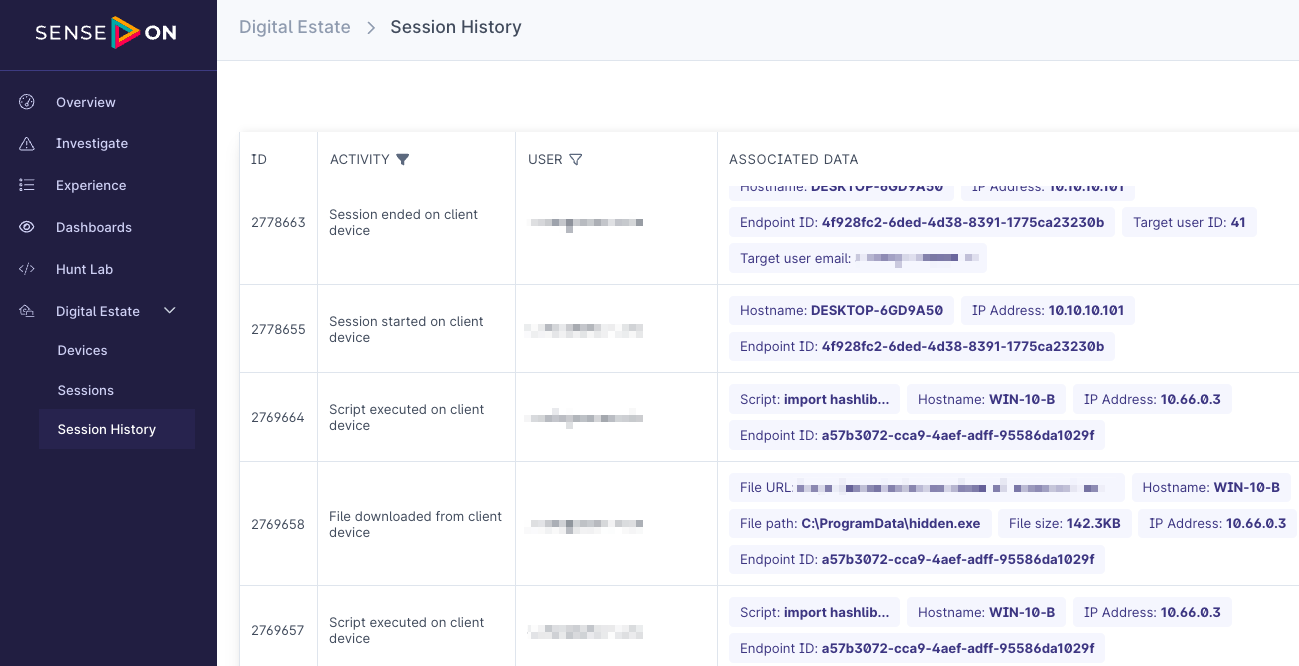
A full audit log of Active Response activity which is attributable to a specific user is available and includes:
- Authentication attempts against the service itself.
- The start and stop of any active response session.
- Execution of scripts including the full script payload.
- Files uploaded and downloaded.
The Active Response Audit Log is at Assets > Device Session History. It is available to Admins with Active Response access. Managers and Analysts cannot view it, even with Active Response access.
Quick Actions
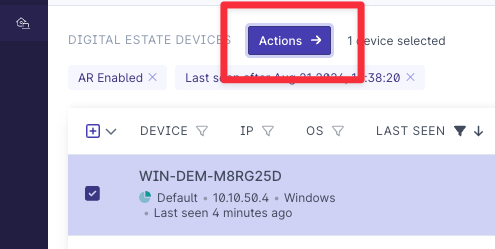
A number of quick actions are available by selecting the hosts from the Active Response page and pressing the Actions buttons.
Host isolation
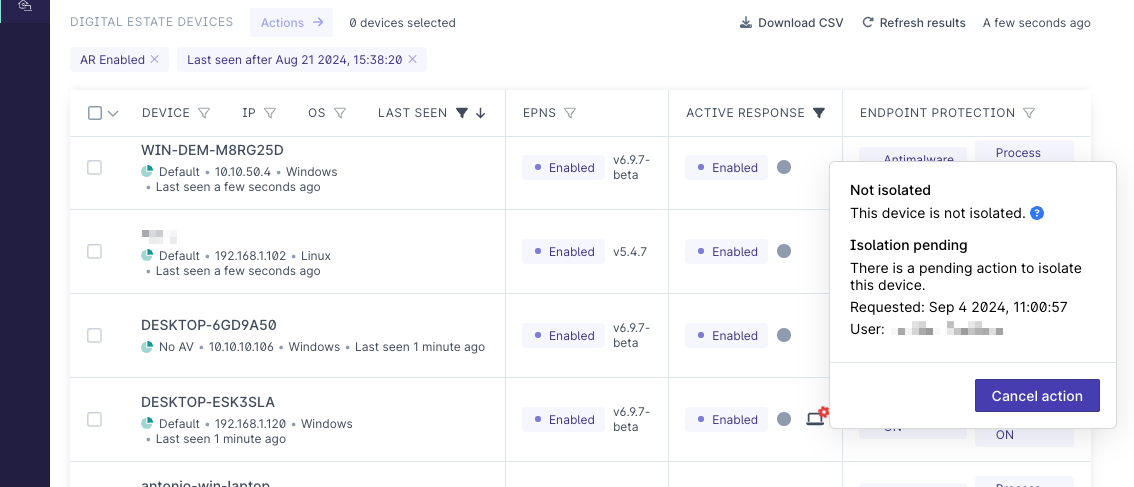
Windows hosts can have outbound network traffic blocked using an Active Response action. This prevents all outbound traffic (except to the SenseOn analysis platform) but still allows inbound traffic to allow for investigation and for tools such as Remote Desktop to connect to the system. Isolated hosts can be unisolated using an Active Response action.
Hosts which are offline will have the Active Response action queued until they are online at which point they action will be performed.
Python Scripts
A Python interpreter embedded in into the endpoint agent which allows cross platform remediation investigation scripts. A Python module is provided within the virtual environment deployed to the hosts which allows access to additional functionality including: * File upload / download * Device isolation * Additional modules in development
rootorsystemlevel.
The following are example scripts which can be used with Active Response.
Active Response Script - Isolation Control