ClickFix: Recognising and Preventing Fake Fix Attacks
ClickFix is a social engineering technique in which a compromised or malicious web page shows the visitor a fake error, verification step, or "fix" prompt, and instructs them to open a system dialog, paste a command that has already been copied to their clipboard, and run it. The command is supplied by the attacker. The person carrying it out is the victim.
MITRE added it to ATT&CK in March 2025 as its own sub-technique, T1204.004 – User Execution: Malicious Copy and Paste, under the parent technique User Execution (T1204).
Why It Matters
ClickFix does not exploit a vulnerability, and it does not require the victim to open an attachment or download a file. Because the victim runs the command themselves, using a legitimate, trusted interpreter that is already present on the machine, the technique sidesteps controls built to catch malicious downloads: email attachment filtering, browser sandboxing and reputation checks, and file-based antivirus scanning never see a file cross the wire.
It is also cross-platform. The same social engineering pattern works against Windows (Run dialog, PowerShell, mshta, cmd), macOS (Terminal, zsh, bash, AppleScript), and Linux, with only the target interpreter changing.
Treat It as Initial Access: A confirmed ClickFix execution should be treated as a potential initial-access incident, because the resulting access may be leveraged or sold to other threat actors. Most campaigns are opportunistic and non-targeted: the victim is compromised simply for visiting a hijacked page, not because they were singled out. The resulting device access is commonly sold on to other criminal groups, ransomware operators in particular, which is why speed of containment matters more than usual even when the initial payload looks unremarkable (an infostealer or generic loader rather than anything obviously destructive).
How It Works
The chain is consistent across almost every campaign, regardless of lure theme or eventual payload:
- Delivery. The victim reaches a page via a compromised legitimate website, malvertising, a phishing email, a fake download portal (pirated software, cracks, "AI tools"), or a spoofed meeting invite.
- The lure. The page displays a fake CAPTCHA, browser or OS error, "update in progress" screen, or document-rendering failure, styled to look legitimate (Cloudflare and Google reCAPTCHA branding are both commonly imitated).
- Clipboard hijack. Interacting with the lure (ticking the fake "I am not a robot" box, clicking "Fix") triggers JavaScript that silently copies an attacker-controlled command to the clipboard. What the victim sees on screen is often harmless-looking placeholder text. The real payload is in the clipboard, not on the page.
- User execution. The page instructs the victim to open a specific system surface and paste. On Windows this is usually the Run dialog (Win+R) or PowerShell. The emerging FileFix variant instead targets the File Explorer address bar, which is not covered by controls that only restrict Win+R. On macOS it is Terminal, iTerm2, or a fake native dialog generated with osascript.
- Execution and staging. The pasted command runs an interpreter already on the machine (mshta.exe, powershell.exe, zsh, bash), which may fetch and execute the next stage directly in memory, while other campaigns may write components to disk. The final payload depends on the campaign. The families listed below are not tied to any one specific campaign or threat actor. They are mentioned purely as illustrative, publicly-documented examples of what ClickFix has been observed delivering: infostealers (Lumma Stealer, Atomic Stealer / AMOS, StealC, Rhadamanthys), loaders, RATs (QuasarRAT), or, in the OAuth-based ConsentFix variant below, no malware at all.
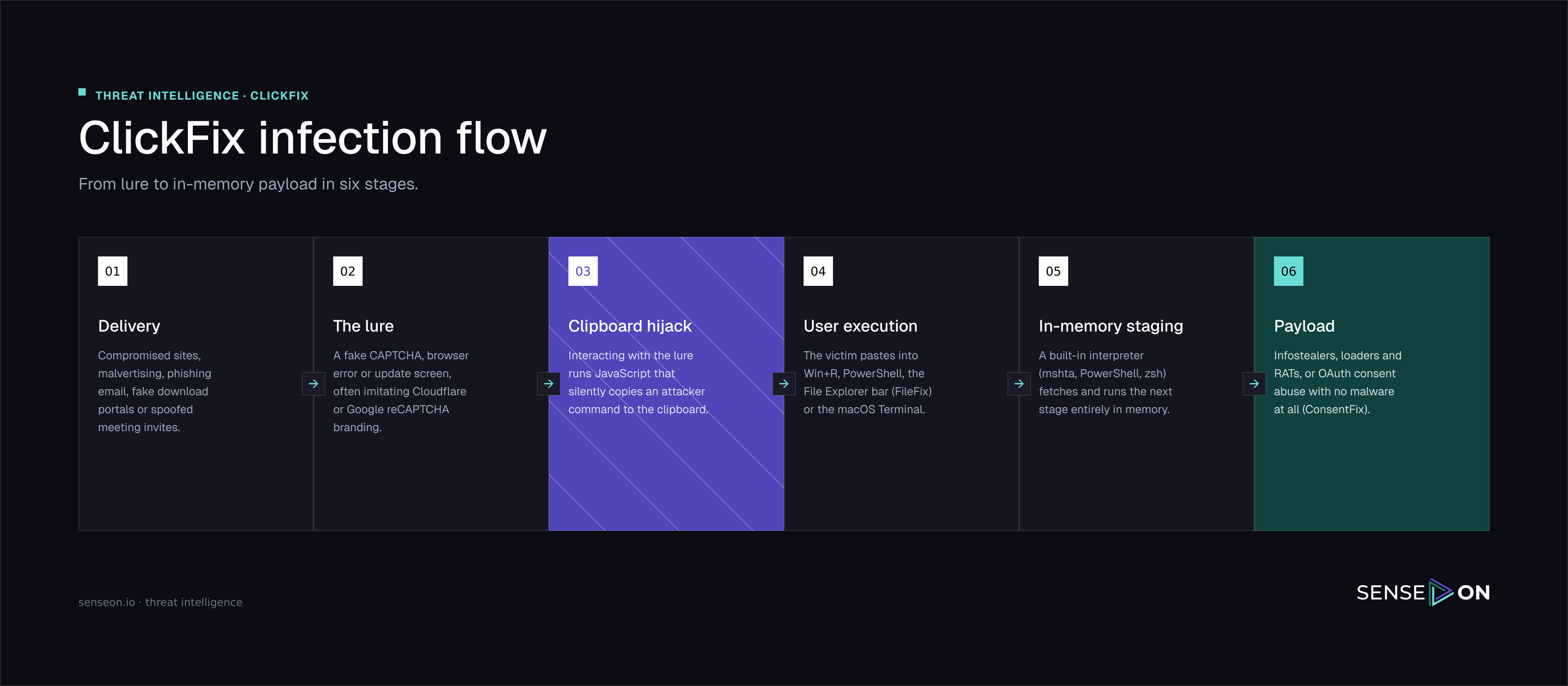
A Typical Attack Chain in Practice
The stages above describe the technique in the abstract. In real incidents the same shape recurs closely enough to be worth documenting as a pattern, mapped against the broader ATT&CK tactics it touches (ClickFix itself only covers Execution, and everything either side of it is ordinary, separately-catalogued behaviour):
| Tactic | What it typically looks like |
|---|---|
| Initial Access | User browses to a legitimate but compromised site, or one reached via malvertising. The page quietly waits for a paste rather than acting immediately. |
| Execution | explorer.exe (or a browser process) spawns an obfuscated one-line PowerShell command. This is the paste-and-run moment. |
| Command and Control | The obfuscated command first reaches out over plain HTTP to retrieve the payload, then a further beacon is established over TLS to a separate host, keeping the "download" and "beacon" infrastructure apart. |
| Discovery | Commands such as whoami /groups and net group "domain computers" /dom run from the same PowerShell or a spawned svchost.exe/scheduled-task session, enumerating the user's privileges and the domain. |
| Persistence | A hidden script is dropped to disk and re-invoked on a schedule (a scheduled task is a common mechanism), so the beacon survives beyond the initial session even if the browser tab is closed. |
The Pattern Worth Internalising: By the time discovery commands run, the "social engineering" part of the incident is over in under a minute, but the process tree it leaves behind (browser → explorer.exe → PowerShell → dropped script → scheduled task → discovery commands) is long-lived and rich in detection opportunities well after the initial paste.
Types and Variants
| Variant | Lure theme | Notes |
|---|---|---|
| Fake CAPTCHA / human verification | "Verify you are human", Cloudflare or reCAPTCHA-styled prompt | The original and still the most common form. Tied to infrastructure such as ClearFake, which compromises legitimate sites to host the lure. |
| Fake Windows Update | Full-screen blue "Working on updates…" splash | Designed to remove all competing visual context so the "finish the update" instruction feels routine. |
| Fake browser/software update | "Your browser needs to be updated" (Chrome, Firefox, Edge, Safari, Brave) | Also tracked separately as FakeUpdates. Same paste-and-run mechanic. |
| Fake meeting/video-conferencing fix | "Fix audio/driver issue" before joining a Teams, Zoom, or Google Meet call | Increasingly targeted at customer-facing roles (sales, support, account management) who join external calls routinely and are primed not to hesitate. |
| Fake document rendering error | "This document can't be displayed, run this to view it" | Delivered via phishing email attachments as well as web pages. |
| Fake macOS utility / system prompt | Native-looking password dialog generated with osascript, or a fake "helper"/"update" utility | Entered passwords are often checked locally and offline (for example via dscl in authonly mode), which avoids normal authentication logging. |
| Fake BSOD | Full-browser overlay mimicking a Windows crash screen | The "fix" is a PowerShell command that supposedly repairs the system. |
| FileFix | Same lure themes, different target: the File Explorer/Finder address bar instead of Run or Terminal | Specifically defeats GPO controls that only disable Win+R. |
| ConsentFix | Fake IT notification, SaaS onboarding email, or AI-tool onboarding lure | No command is run at all. The victim is walked through a real OAuth 2.0 consent screen and clicks "Accept", granting a malicious app persistent, token-based access. Survives password resets and MFA changes, and shows up in logs as ordinary authorised OAuth activity. |
How to Identify It
The tell is almost always the same, regardless of theme: a legitimate verification step, error message, or update never asks you to open a terminal, Run dialog, or address bar and paste something.
Other red flags worth training people to notice:
- Any prompt that requires pressing Win+R, opening PowerShell, or opening Terminal to "continue", "verify", or "fix" something.
- Clipboard content that looks like harmless text on screen but is longer or different when actually pasted.
- CAPTCHA-style prompts on pages that have no obvious reason to gate content behind verification.
- Being asked to complete a "fix" before joining a call, opening a document, or finishing a download.
- For technical staff: any command copied from a search result, forum, or AI chat assistant should be read before it is run, not pasted blind.
Trends
- Volume and speed. ClickFix went from a niche technique first observed in October 2023 (under the earlier name ClearFake) to one of the most common initial access vectors in barely two years.
- Commoditisation. ClickFix-as-a-Service kits are now sold on criminal forums, bundling CAPTCHA templates, rotating domains, and choice of payload, which lowers the barrier to entry considerably.
- State and criminal use side by side. CERT-UA attributed a cluster of ClickFix attacks on compromised Ukrainian websites to Sandworm. DPRK-linked Contagious Interview campaigns and commodity infostealer operators (Lumma Stealer, AMOS) use the same technique.
- Cross-platform expansion. macOS-specific campaigns have grown substantially through 2026. Apple added an OS-level mitigation in March 2026 (macOS 26.4) that scans commands pasted into Terminal, and within weeks a variant emerged abusing the applescript:// URI scheme to reach Script Editor instead, avoiding Terminal entirely.
- Evasion of the obvious fix. FileFix emerged specifically to route around organisations that disabled Win+R, by targeting the File Explorer/Finder address bar instead.
- Evolution beyond command execution. ConsentFix removes the "paste and run" step entirely in favour of OAuth consent phishing, which existing ClickFix-specific controls (disabling Run, blocking mshta) do nothing to stop.
- Targeting is getting more deliberate. Recent campaigns have targeted specific job functions (customer-facing roles via fake meeting lures) and organisations with public AI initiatives (AI-onboarding themed lures), rather than purely opportunistic delivery.
Detection
Windows
- RunMRU registry key. Every use of the Run dialog creates an entry under
HKEY_CURRENT_USER\Software\Microsoft\Windows\CurrentVersion\Explorer\RunMRU. This is the single highest-yield artefact for this technique, and Microsoft has observed attackers steering victims back toward the Run dialog specifically because Windows Terminal's multi-line paste warning makes Terminal a harder sell. - Process ancestry. explorer.exe spawning powershell.exe, mshta.exe, or cmd.exe with no other legitimate reason to do so is a strong signal, particularly combined with an unusually long or obfuscated command line.
- Command length. Rather than keying on specific lure wording (which changes constantly), several practitioners hunt on command line length instead. Observed ClickFix commands average around 179 characters, and filtering for command lines over roughly 50 characters is far more durable than keyword matching.
- WDAC/AppLocker audit signals. Deploying a WDAC policy, even in audit-only mode, blocks mshta.exe outright in many configurations and is worth alerting on even before full enforcement.
macOS
- Terminal or iTerm2 spawning zsh, bash, or python with a download-and-decode command line.
- File creation under
/tmp/or the user's Library directory immediately following such a process chain. - osascript generating a native-looking password prompt, followed by a local, offline password check (for example via dscl in authonly mode) rather than standard authentication. Legitimate software rarely validates a password this way, so the evasion technique is itself a usable detection signal.
How SenseOn Helps You Verify
The building blocks already documented elsewhere in this site apply directly to ClickFix. This section maps them to the technique rather than introducing anything new:
- Hunt Lab can query endpoint telemetry for the process-ancestry and command-length patterns above across the whole estate, rather than sampling individual machines. See the Hunt Lab Training series for query patterns.
- Endpoint Protection (EPP) and Reflex provide the behavioural and automated-response layer for the LOLBin abuse described above (
mshta, PowerShell spawned fromexplorer.exe, and similar). - Assets shows whether ASR rules, WDAC policy, and PowerShell logging are actually deployed and reporting across the estate, which is usually where the gap between intended and real hardening first appears.
Mitigation and Hardening
The following controls reduce the chance a ClickFix lure succeeds in the first place, or limit what it can do if it does. As with the rest of this section, follow the same audit-before-you-enforce ring model used elsewhere: observe in audit/report-only mode, measure for at least one full business cycle, then roll out to IT and security staff, a representative cross-section of the business, and finally the whole estate.
| Priority | Control | Why it matters here |
|---|---|---|
| 1 | Enable PowerShell script block logging | Already priority 5 in the short version table on the overview page, and the single highest-value addition for investigating a suspected ClickFix execution after the fact. |
| 2 | Enforce PowerShell Constrained Language Mode via WDAC or AppLocker | Restricts PowerShell to a safe subset of cmdlets, blocking the direct .NET and COM access that most ClickFix payloads rely on, even if the command is pasted and run. |
| 3 | Block or restrict mshta.exe | A large share of ClickFix payloads use mshta specifically because it is a trusted, signed Windows binary. A WDAC policy in audit mode alone blocks this in many configurations. |
| 4 | Enable the relevant Attack Surface Reduction rules | In particular, blocking Office applications from creating child processes and blocking execution of potentially obfuscated scripts, both already covered on the Windows Endpoints page. |
| 5 | Disable the Run dialog and Win+R via Group Policy | User Configuration → Administrative Templates → Windows Components → File Explorer → Turn off Windows key hotkeys. Treat as a speed bump, not a fix: it does nothing against FileFix, which targets the File Explorer address bar instead. |
| 6 | Restrict OAuth application consent to admin approval | Directly addresses ConsentFix, which does not involve a pasted command at all. Cross-reference Control application consent on the Identity hardening page. |
| 7 | Restrict Terminal and shell interpreters on macOS via MDM | Application control policies limiting who can invoke zsh, bash, and osascript-driven prompts, backed by System Integrity Protection and up-to-date XProtect/Gatekeeper definitions. |
| 8 | Targeted user awareness | Generic phishing simulations do not prepare people for this. The one line worth repeating in training, onboarding, and internal signage: no legitimate website, vendor, or internal system will ever ask you to paste a command into a system window. Cover the specific lure contexts in use (fake updates, meeting/call fixes, document errors, AI-tool onboarding), not just email attachments. |
| 9 | Disable Terminal and Command Prompt entirely for users who do not need them | Broader than just restricting Win+R: for most business users neither cmd.exe nor a shell is a legitimate day-to-day tool. Removing access via GPO or MDM closes the execution surface rather than just one route into it. |
| 10 | Deploy ad-blocking, host- and network-level | A large share of ClickFix delivery rides on malvertising and compromised ad CDNs rather than direct phishing links. Host-level and network-level ad-blocking removes a meaningful chunk of the delivery surface. Web allow-listing is worth considering for higher-security environments. |
| 11 | Control DNS-over-HTTPS centrally | Left to its default, DoH in the browser removes visibility from DNS-based blocking and logging. Enforcing a consistent DoH configuration (or routing it through a resolver your own tooling can see) keeps DNS-layer detection and blocklists effective. |
| 12 | Enforce AppLocker (or an equivalent application control tool) to block unapproved software installs | Removes a common downstream step in ClickFix chains where the pasted command installs or launches software the user was never authorised to run in the first place. |
| 13 | Extend user awareness to cracked software and unofficial third-party sources | Fake download portals for pirated software, cracks, and licence-key generators are a common ClickFix delivery route in their own right, distinct from the fake-CAPTCHA and fake-update lures covered above. |
If You Confirm a Compromise
If a ClickFix execution is confirmed, a reasonable baseline response looks like this, regardless of what the specific payload turns out to be:
- Isolate the device from the network as soon as the behaviour is confirmed, rather than waiting to fully characterise the payload first.
- Reset the affected user's credentials and revoke all active sessions and refresh tokens, even if the compromise looks device-only. This is precautionary: session tokens or cached credentials on the device may otherwise remain usable elsewhere.
- Examine sign-in and activity logs for the affected account for anything anomalous around the time of the incident.
- Review OAuth application activity and permissions granted to or by the account, particularly relevant if a ConsentFix-style variant is suspected.
- Check inbox rules and MFA configuration changes for anything the attacker may have added to maintain access or intercept mail.
- Reimage the device to a known-good build rather than attempting to clean it in place. The low cost of reimaging is rarely worth the residual risk of an incomplete cleanup.
- Block the confirmed malicious infrastructure (domains and IPs involved in delivery and command and control) at the firewall or proxy, and check for any other devices that contacted the same infrastructure.
- Talk to the user. Understanding what they clicked and why (what the lure looked like, what site or email led them there) is usually the fastest way to find related exposure and to improve the specific awareness content that will actually help next time.
- Consider reporting the infrastructure to threat intelligence sharing communities or browser safety providers (Google Safe Browsing, Microsoft SmartScreen, and so on), particularly where the delivery site was a compromised legitimate domain rather than attacker-owned infrastructure.
Related Pages
- Windows Endpoints for PowerShell controls, ASR rules, and local administrator rights.
- Identity and Access (Microsoft Entra ID) for application consent restrictions relevant to ConsentFix.
- Hunt Lab for building the process-ancestry and command-length hunting queries described above.
- MITRE ATT&CK T1204.004 for the canonical technique reference.