Streaming Logs from Azure Event Hubs
This guide is for customers who want to stream logs from Azure Event Hubs into SenseOn. You complete these steps in your own Azure tenant, then hand a small set of details to SenseOn. It covers three cases: you have no Event Hub yet, you already have one or more, and a single hub that carries data from several sources.
The connection string is a credential. Share it with SenseOn only over an approved secure channel, never by email, chat, or ticket.
How it works
SenseOn reads your Event Hub through its Kafka-compatible endpoint. Every Standard-tier or higher Event Hubs namespace exposes one on port 9093. This works whether you create a new Event Hub or use one you already have.
You provision or identify the Event Hub, give SenseOn a read-only access policy and a dedicated consumer group, point your log sources at it, and hand over the connection details. SenseOn does the rest.
Your log producers (Entra ID logs, Azure Monitor, apps)
        -> Azure Event Hub (your tenant)
        -> Kafka protocol (TLS, 9093)
        -> SenseOn ingestion
Prerequisites
- An Azure subscription, with at least Contributor on it, or access to your existing Event Hubs namespace with rights to add consumer groups and access policies.
- For new namespaces, the
Microsoft.EventHubresource provider registered:
az provider register -n Microsoft.EventHub
Step 0: Tier requirement (read first)
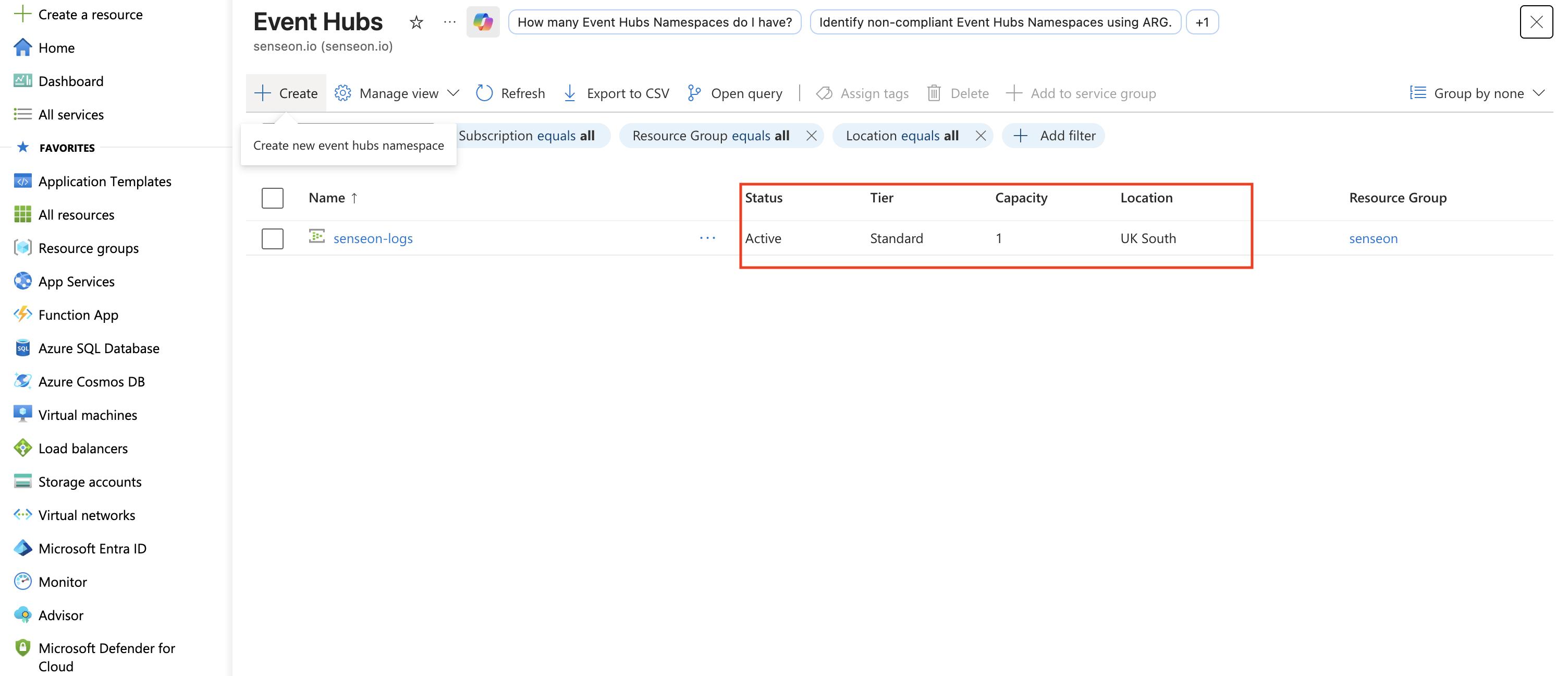
The Event Hubs namespace must be Standard tier or higher. The Basic tier does not expose the Kafka endpoint and only allows the single $Default consumer group, so it cannot be used.
If your existing namespace is Basic, upgrade it to Standard. This is an in-place change. Your data and hubs are kept. Standard is enough for log ingestion.
You can confirm the tier from the Event Hubs list, in the Tier column.
Step 1: Choose your path
Path A: you do not have an Event Hub yet
The hierarchy is: Namespace (the broker) -> Event Hub (the stream) -> a Consumer group plus a Listen-only Shared Access Policy.
Portal
- Create a resource > Event Hubs > create a namespace. Pick a region close to your log sources and set Pricing tier = Standard.
- In the namespace, + Event Hub. Name it (for example
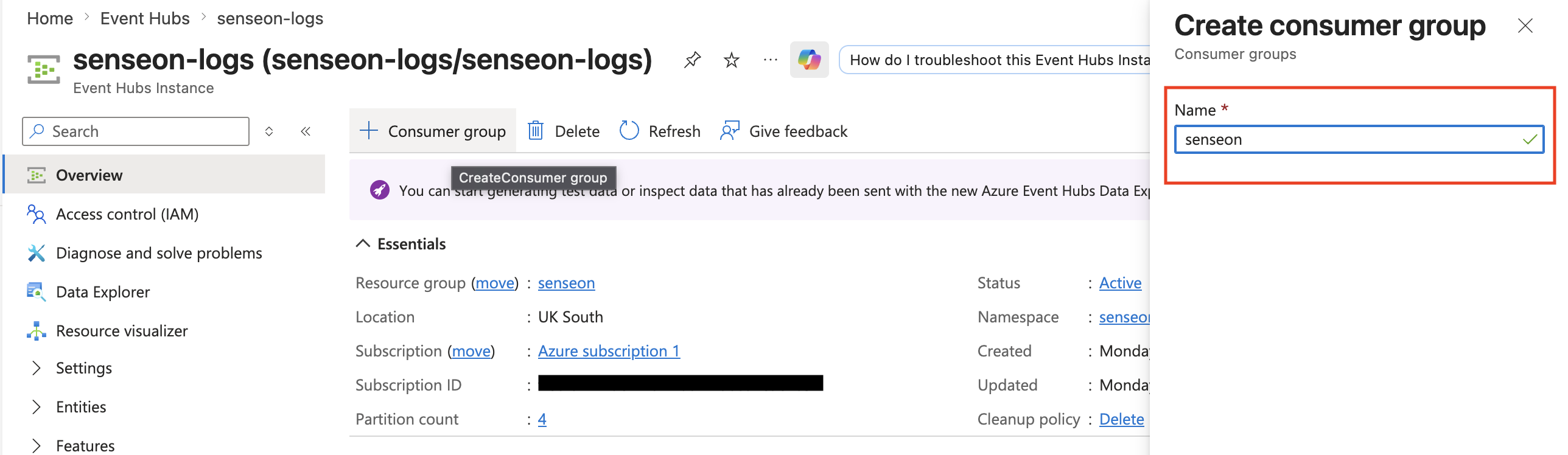
senseon-ingress); 4 partitions is a sensible default. Create one hub per log stream you want to keep separate, or a single hub if you are happy to mix (see Step 3). - Open the Event Hub > Consumer groups > + Consumer group, name it
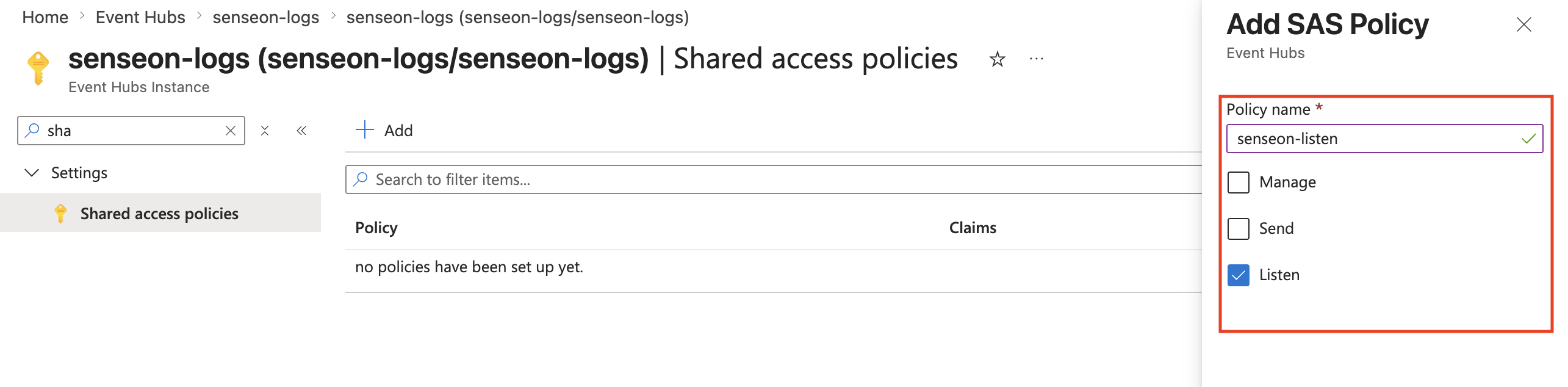
senseon. - Open the Event Hub > Shared access policies > + Add, name it
senseon-listen, tick Listen only, then Create.
Azure CLI
RG=rg-senseon-ingest
NS=<your-namespace>        # globally unique, becomes <NS>.servicebus.windows.net
HUB=senseon-ingress
LOCATION=westeurope

az group create -n "$RG" -l "$LOCATION"
az eventhubs namespace create -g "$RG" -n "$NS" -l "$LOCATION" --sku Standard
az eventhubs eventhub create -g "$RG" --namespace-name "$NS" -n "$HUB" --partition-count 4
az eventhubs eventhub consumer-group create -g "$RG" --namespace-name "$NS" --eventhub-name "$HUB" -n senseon
az eventhubs eventhub authorization-rule create -g "$RG" --namespace-name "$NS" --eventhub-name "$HUB" -n senseon-listen --rights Listen
Path B: you already have an Event Hub or hubs
You do not need to recreate anything. For each hub you want SenseOn to read:
- Confirm the namespace tier is Standard or above (Step 0).
- Add a dedicated consumer group named
senseonon each hub. - Create a Listen-only access policy. A namespace-level policy is simplest when there are several hubs, since one connection string then covers them all. If you prefer tighter scope, create a per-hub Listen policy instead and send one connection string per hub.
- Note the names of the hubs SenseOn should read.
$Defaultconsumer group or one your own consumers already use. Consumer groups share read offsets, so a shared group would make SenseOn and your existing readers compete for messages and corrupt each other's position. A separate group is non-disruptive. It gives SenseOn an independent cursor over the same data. Standard allows up to 20 consumer groups per hub.
Azure CLI (existing namespace)
RG=<your-resource-group>
NS=<your-existing-namespace>

# Add a dedicated consumer group on each hub SenseOn should read (repeat per hub)
az eventhubs eventhub consumer-group create -g "$RG" --namespace-name "$NS" --eventhub-name <existing-hub> -n senseon

# Create one namespace-level Listen policy that covers all hubs
az eventhubs namespace authorization-rule create -g "$RG" --namespace-name "$NS" -n senseon-listen --rights Listen
Step 2: Retrieve the connection string
This is the secret SenseOn needs. Keep it safe.
Namespace-level policy (covers all hubs, recommended for several hubs)
az eventhubs namespace authorization-rule keys list -g "$RG" --namespace-name "$NS" -n senseon-listen --query primaryConnectionString -o tsv
It looks like Endpoint=sb://<NS>.servicebus.windows.net/;SharedAccessKeyName=senseon-listen;SharedAccessKey=... (no EntityPath).
Per-hub policy (one connection string per hub)
az eventhubs eventhub authorization-rule keys list -g "$RG" --namespace-name "$NS" --eventhub-name "$HUB" -n senseon-listen --query primaryConnectionString -o tsv
It looks like Endpoint=sb://<NS>.servicebus.windows.net/;SharedAccessKeyName=senseon-listen;SharedAccessKey=...;EntityPath=<HUB>.
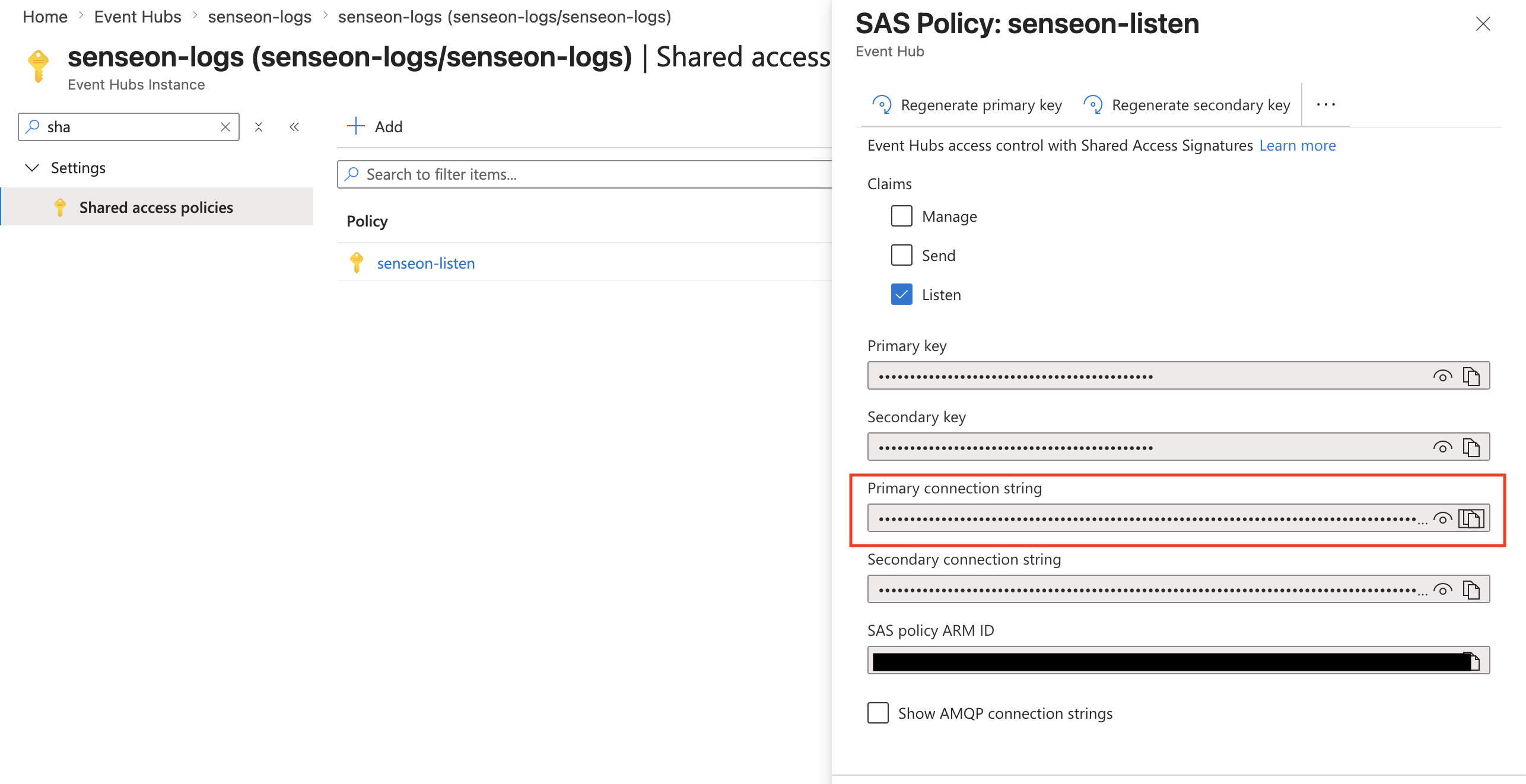
Portal equivalent: Shared access policies > senseon-listen > copy Connection string–primary key, on the namespace or the hub depending on which policy you created.
Step 3: Point your log sources at the Event Hub
If you are already streaming into an existing hub, your sources are set up. Just tell us which hubs to read. Otherwise, common options:
- Microsoft Entra ID sign-in and audit logs: Entra ID > Diagnostic settings > stream to the Event Hub.
- Azure Monitor, activity logs, resource diagnostics: each resource's Diagnostic settings > stream to the Event Hub.
- Your own applications: send via the Event Hubs SDK or any Kafka producer pointed at
<NS>.servicebus.windows.net:9093.
A single hub carrying several sources
This is fully supported. A hub can carry data from many sources at once, for example, several Diagnostic settings all streaming to the same hub. SenseOn classifies each record by its content (Azure diagnostic logs are self-describing through fields such as category and resourceId), so it does not rely on one hub meaning one source.
Two asks to make this smooth:
- If it is easy for you, send distinct log types to separate hubs. It makes routing cleaner. This is a nice-to-have, not a requirement.
- For any hub that mixes sources, tell us it is mixed and confirm the data is standard Azure diagnostic-settings JSON. If a hub also carries a custom or non-Azure format with no common identifying field, let us know so we can plan for it or ask you to separate that stream.
Step 4: Networking
SenseOn reads the namespace over its public Kafka endpoint on TCP 9093. If you have not restricted namespace access, nothing more is needed.
If you restrict access with namespace firewall rules but leave public network access enabled, ask your SenseOn contact for the egress IP ranges to allow-list.
If you disable public network access and expose the namespace through a Private Endpoint only, the public Kafka endpoint is no longer reachable and IP allow-listing will not help. Talk to your SenseOn contact before locking it down so we can agree a workable connectivity path.
Step 5: Hand over to SenseOn
Send SenseOn the following, the connection string over a secure channel only:
| Item | Example | Where to find it |
|---|---|---|
| Namespace bootstrap host | <NS>.servicebus.windows.net:9093 |
Namespace overview, append :9093 |
| Event Hub name(s) | senseon-ingress, entra-logs, activity-logs |
The hub instance names. List all we should read |
| Consumer group | senseon |
The dedicated group you created on each hub |
| Connection string | Endpoint=sb://...;SharedAccessKey=... |
Step 2 (Listen policy) |
Also tell us, per hub:
- Single-source or mixed? And if mixed, confirm it is Azure diagnostic-settings JSON.
Good practice
- Least privilege: the policy you share is Listen only. Never hand over the namespace-level
RootManageSharedAccessKey. - Dedicated consumer group: always give SenseOn its own
senseongroup, never$Defaultor one your own consumers use. - Rotation: to rotate, regenerate the SAS key in Azure and send SenseOn the new connection string. SenseOn updates its side without downtime.
- Retention: the Event Hub retention (1 to 7 days on Standard) is a buffer, not long-term storage.